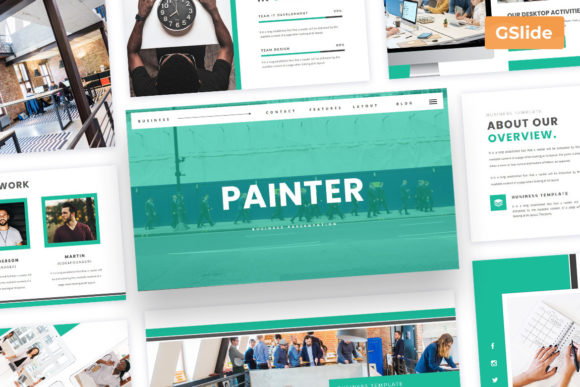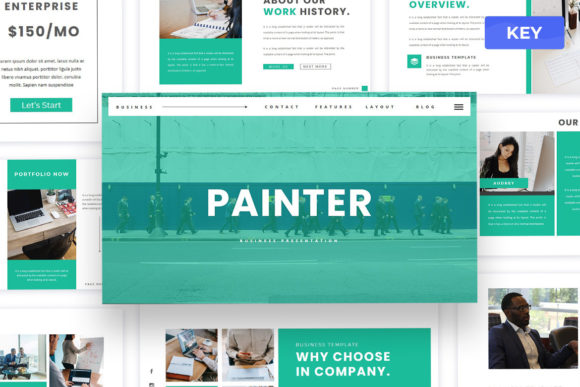
Painter: A Modern Keynote Template for Creatives
In the world of visual communication, the medium is often just as important as the message. Whether you are pitching a new brand identity to a potential client, presenting a quarterly review to stakeholders, or showcasing a personal art portfolio, the design of your slides sets the tone before you speak a single word. The Painter - Business Keynote Presentation template emerges as a versatile tool designed to bridge the gap between artistic expression and professional clarity. It is not merely a collection of pre-made slides; it is a structured canvas that allows creators, entrepreneurs, and educators to tell their stories with elegance and precision.
At its core, this template embraces a minimalist aesthetic that prioritizes content over clutter. In an era where attention spans are short and visual noise is everywhere, the ability to present information cleanly is a superpower. The layouts found within Painter are crafted to be modern and unique, avoiding the generic, overused tropes often seen in standard corporate decks. Instead, they offer a fresh perspective that feels both creative and grounded, making them suitable for a wide array of industries ranging from design studios and marketing agencies to individual freelancers and small business owners.
Versatility Across Industries and Roles
One of the most compelling aspects of the Painter template is its adaptability. While the name suggests an artistic leaning, its utility extends far beyond the realm of fine arts. For a marketing agency, the clean lines and ample whitespace provide the perfect backdrop for displaying campaign metrics, case studies, and strategy roadmaps without overwhelming the viewer. The drag-and-drop object placeholders make it incredibly easy to swap out data visualizations or insert high-resolution screenshots of social media performance.
For architects and interior designers, the template's focus on imagery is invaluable. The media placeholders allow users to change pictures in a single click, ensuring that high-quality renders of projects take center stage. The overlay picture effects add a layer of sophistication, allowing text to remain legible even when placed over complex backgrounds. This feature is particularly useful for professionals who need to annotate images or explain design choices directly on the slide.
Even educators and trainers can find significant value here. The organized structure of the 30 total slides helps in breaking down complex subjects into digestible segments. By utilizing the resizable vector elements, an instructor can emphasize key concepts or create custom diagrams that align perfectly with their lesson plan. The use of free and popular web fonts like Montserrat and Open Sans ensures that the text remains crisp and readable on any screen, whether projected in a lecture hall or viewed on a laptop during a remote learning session.
Streamlining the Creative Workflow
Time is a scarce resource for most professionals. Spending hours aligning text boxes, matching colors, or hunting for the right icon detracts from the actual work of refining the narrative. The Painter template addresses this by offering a highly organized file structure where all components are neatly arranged. The inclusion of XML Color Themes is a standout feature for efficiency. With just a few clicks, users can alter the entire color palette of the presentation to match specific brand guidelines. This means a freelancer working with multiple clients can quickly adapt the same deck to fit different corporate identities without manually editing every single element.
The technical flexibility further enhances the user experience. The template is available in both animated and static PDF versions, providing options for different delivery methods. If you are presenting live, the subtle animations can guide the audience's eye and maintain engagement. If you are sending a deck for asynchronous review, the PDF version ensures that your formatting remains intact regardless of the recipient's software. Additionally, the inclusion of editable country maps opens up possibilities for businesses with global operations, allowing them to visualize market reach or logistical networks with ease.
Practical Applications for Freelancers and Startups
For freelancers and startup founders, first impressions are critical. A polished presentation can be the difference between securing a contract and losing a lead. The Painter template allows these users to project an image of professionalism and competence immediately. Imagine a graphic designer pitching a rebranding project. Using the unique layouts in this template, they can showcase mood boards, typography pairings, and logo variations in a way that feels cohesive and curated. The "drag drop" functionality means they can iterate on the fly during a meeting if a client asks to see a different image or variation.
Similarly, a small business owner looking to attract investors can use the template to outline their business model, financial projections, and growth strategy. The minimalist design ensures that the numbers and facts stand out, while the elegant styling adds a touch of prestige to the pitch. Because the fonts are fully editable, there is no risk of the presentation looking generic; users can incorporate their own branding fonts if they prefer, though the included Montserrat and Open Sans offer a safe, modern default that works well for almost any context.
Maintaining Clarity and Consistency
While having a beautiful template is a great start, the effectiveness of a presentation ultimately depends on how it is used. To get the most out of the Painter template, users should focus on consistency. Since the template offers unlimited color options via the XML themes, it is tempting to experiment with many different hues. However, sticking to a defined palette—perhaps one primary color, one secondary accent, and a neutral background—will keep the presentation looking sharp and professional.
Another key to success is leveraging the Full HD resolution capabilities. In today's high-definition display environment, pixelated images can undermine credibility. Users should ensure that all assets dropped into the placeholders are high quality. The template supports images from sources like Unsplash and Pexels, which are excellent resources for finding professional-grade photography that complements the minimalist vibe of the slides.
Organization is also paramount. With 30 slides at your disposal, it is important to structure the narrative logically. Use the section dividers effectively to signal transitions between topics. The neat organization of the components within the Keynote file makes it easy to duplicate successful slide structures or rearrange the flow of the story as needed. This structural integrity helps the audience follow along without getting lost in a sea of information.
Final Thoughts on Elevating Your Presentations
The Painter - Business Keynote Presentation template represents more than just a time-saving asset; it is a catalyst for better communication. By removing the friction of design decisions, it allows users to focus on what truly matters: the story they are telling and the value they are delivering. Whether you are an artist showcasing a gallery collection, a consultant outlining a strategic pivot, or a teacher inspiring a classroom, this tool provides the foundation you need to succeed.
The combination of modern aesthetics, practical features like fast color changing and editable maps, and the robust support system—including documentation and free updates—makes it a reliable choice for anyone serious about their visual output. In a professional landscape that increasingly values clarity and creativity, having a tool that seamlessly blends both is an invaluable advantage. Embrace the simplicity, utilize the flexible features, and let your content shine through a design that respects both your time and your audience's attention.